On this blog over 10 years ago, I made a rallying cry for the field of computer programming to use richer media, to evolve its expression beyond text.
(My most viral article. #1 on Hacker News for a day. Bless you, salacious title.)
Then I yearned for a productivity boost. Recent AI adoption essays and product shifts brought that old argument back to mind. Today’s moment in agentic coding might be what I was asking for. Even as I adopt AI’s higher leverage, I can’t help feel wistful.
Back to reality
Despite my rallying cry, I personally doubled down on the skill of pushing around text. My programming workhorses to this day remain the terminal and Vim. Given the programming medium we currently have, mastery of that medium still compounds. See my dotfiles commit history for how much I’ve sharpened that ax.
Pushing around plain text like via the terminal is precise. It’s fast. It’s fun. When I pair, teammates are startled by the speed of it. It’s the closest ol’ crusties like me get to the flow state of working with your hands on the job. Typing uses your hands, of course, but not in the connected, intimate way that you would bartending or woodworking all day, say. So the shortcuts and chords of a TUI are the next best thing.
This addresses a couple of my crafter values.
-
Have fun. The thread that’s fun is the one you’ll keep pulling, until you see it through. This works whether developing a skill or a project.
-
Shorten the feedback loop. From my dotfiles README:
Use whatever makes you productive. Keep investing in and sharpening your tools to shorten the feedback loop. The quicker it is to try an idea or to cross reference it, the quicker it is to improve upon or discard.
Fun as it is, for the arcane minutiae of coding, I don’t necessarily recommend that beginners cling to 1970s tech the way I have. In the era of AI agents, it is starting to matter less either way. The feedback loop is becoming less about how deftly and hands-on you wield the tools, and more how well you steer.
Under editor pressure
Around the time I resumed a full-time role in tech in 2025, the networking buzz was all about Cursor, an AI-oriented VSCode fork. All my teammates were using it. I feared, will I finally have to adopt VSCode?
VSCode never clicked for me. The persistent chrome and editor config inflicted on the team felt intrusive. Why should a repo care what GUI I use? I wanted code maximized, chrome hidden, and every mode switch reachable from home row. Every mouse reach to cross reference something felt like death. Maybe Vim spoiled me. VSCode’s Vim emulation never came close.
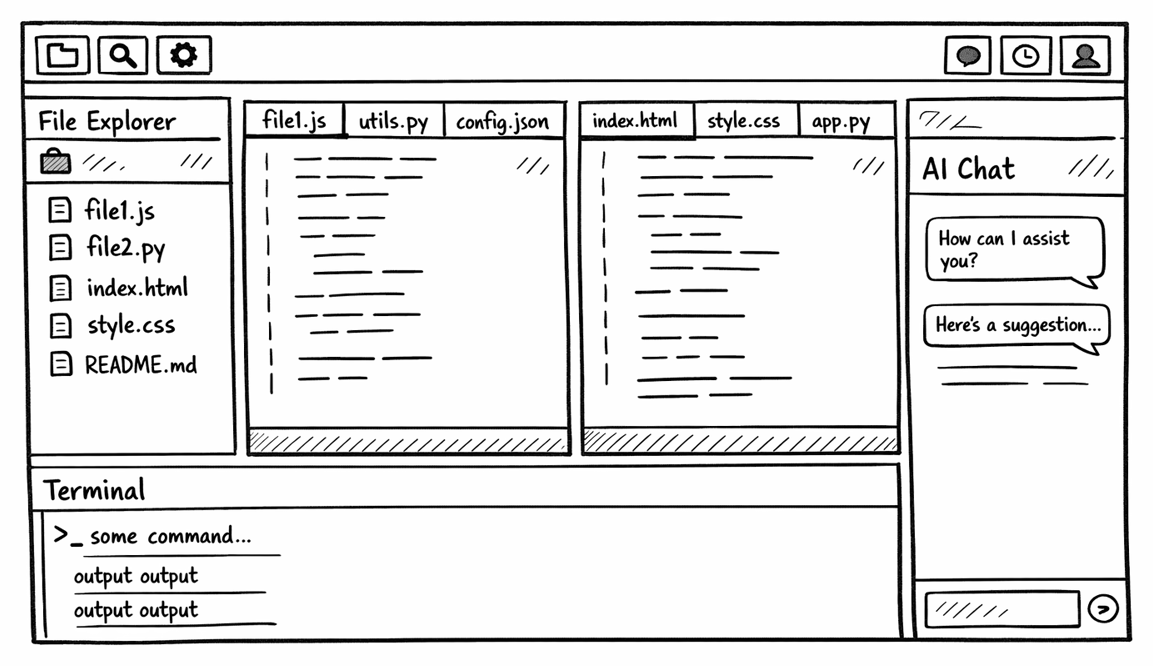
A VSCode-alike layout, with the file tree, editor, terminal, and agent all competing for width.
More worryingly, I wondered, with 2025’s leaps in AI-assisted coding, is 1970s terminal tech finally, truly holding me back? Was I missing out on a real superpower that only tools like Cursor could unlock?
Revenge of the TUI
Under the hood, VSCode-alikes are just calling tools. GUIs atop CLIs. To format or compile your project, they invoke the same commands a human would in a terminal or CI would in the cloud. Over the years, IDEs added proprietary magic to their tool calling to varying degrees. But the more IDEs instead adopted the Unix philosophy, the more harmony, the more mindshare they got. The more proprietary magic, the more they fell behind other editors.
What is the Unix philosophy, which guided so many programmers and is suddenly more relevant than ever? My favorite shorthand, bolding mine:
Write programs that do one thing and do it well. Write programs to work together. Write programs to handle text streams, because that is a universal interface.
You know what is good at dealing with large amounts of text? LLMs.
The first compelling AI feature in editors like Cursor was interactive autocomplete: a smarter form of help at the human’s cursor. But LLMs shine when they can take in large amounts of text. That bottlenecks on wherever the human happens to be typing. Why limit the model to the cursor when an agent can instead read whole files, tool output, and diffs faster than the human can?
If a text-based interface is good for LLMs, the hot technology of the day, text-based stops seeming retro for humans.
Enter a parade of competing TUIs like Claude Code claude, OpenAI Codex
codex, and Cursor cursor-agent. The LLM-based agents are just inputting and
outputting text and shelling out to tools. Why launch a heavyweight GUI if
you’re just going to push text around?
Perhaps a GUI around an AI isn’t so much heavyweight as trying to wrangle something too powerful. The creator of Claude Code started the product in the terminal, because “the model is improving so quickly, we felt that there wasn’t really another form factor that could keep up with it.”
The appearance of these TUIs let me avoid VSCode-alikes, once more. I could arrange my terminal splits in a way that mimicked the Cursor GUI’s split editor and AI chat panel. Better than a mimic, I could leap between the splits in the way that Vim and terminal splits long made sense and felt unified to me, building upon my compound fluency. I didn’t lose my investment in pushing around text. Yet.
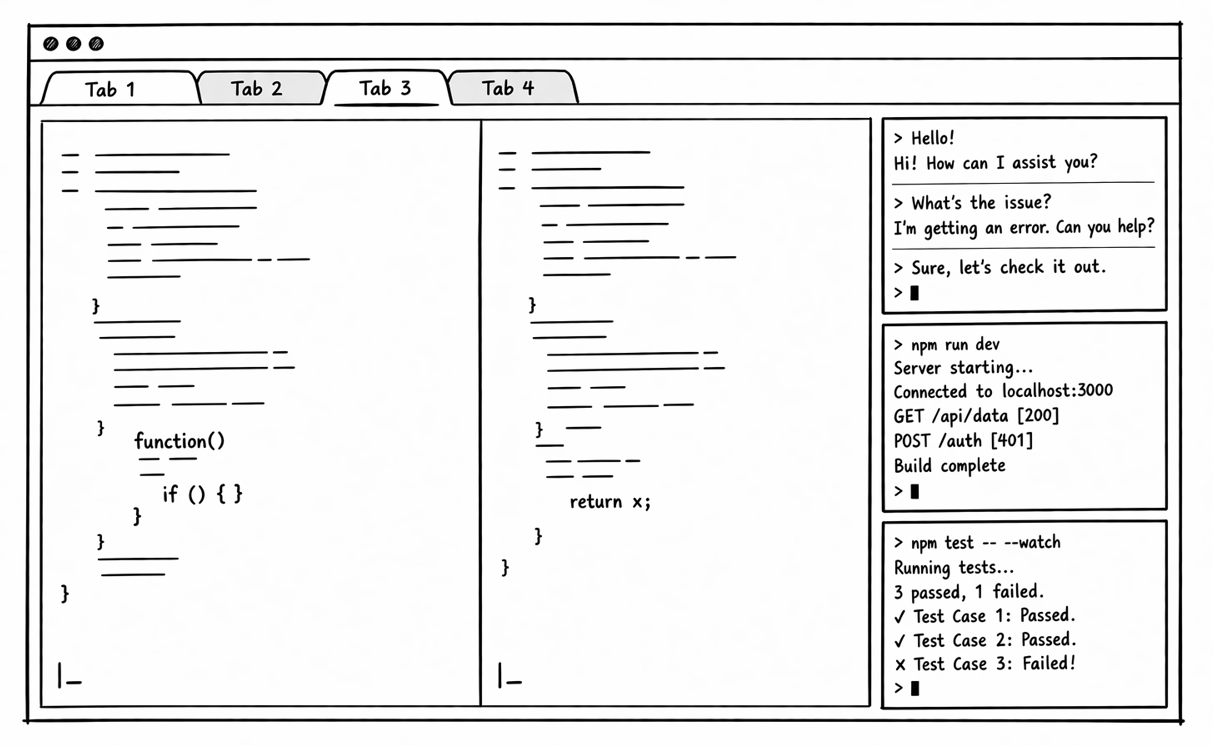
Terminal splits gave me the same ingredients with less chrome and faster movement.
Hardcore mode
I’m not the most hardcore I could be with the terminal. My hands do leave home row. Outside Vim, I do use a mouse, to scroll or copy text.
I’m also not the most hardcore I could be with AI-assisted coding, with the Vim + terminal setup I’ve described so far. On the Steve Yegge scale of AI adoption, I’m only on stage 3-4 out of 8.
Stage 3: Agent in IDE, YOLO mode: Trust goes up. You turn off permissions, agent gets wider.
Stage 4: In IDE, wide agent: Your agent gradually grows to fill the screen. Code is just for diffs.
You could argue whether I’m in an “IDE” with Vim or not. That doesn’t matter. The width is the interesting observation.
Cursor foresaw this evolution of programmers. In late 2025, it forced an update that renamed its AI chat panel “Agent Mode” and defaulted it to be wider than the code editor. Most users were used to the editor being wider, like in the earlier images in this article. Users complained, which convinced the Cursor team to revert. In April 2026, Cursor is retrying the AI window takeover with their v3 release.
Cursor was onto something. The enlightened AI-assisted programmer cares less and less about the code viewer. The more you trust the AI, the more you focus on good interaction with the agent. Anything outside that interaction is a bottleneck where humans get in the way.
It might be the human at the computer getting in the way, or it could be the IDE maintainers overengineering the chat interface. Peter Steinberger suggested stripping away these GUI facades around the AI, to just talk to it (one of the most inspiring AI-adoption journeys I’ve read). Treat the AI model less like a feature inside an IDE and more like the primary interface. Widen the interaction with the agent. Shrink the ornamentation around the agent responses.
Inspired by Steinberger’s article, you might advance to Yegge stages 5-6.
Stage 5: CLI, single agent. YOLO. Diffs scroll by. You may or may not look at them.
Stage 6: CLI, multi-agent, YOLO. You regularly use 3 to 5 parallel instances. You are very fast.
The terminal splits no longer mimic VSCode. They’re stripped to bare, uniform AI chat threads. The ubiquitous chat threads we see on the likes of chatgpt.com and claude.ai (and every legacy app cramming a chatbot into the sidebar and claiming to be “AI native”).
Programming becomes something else.
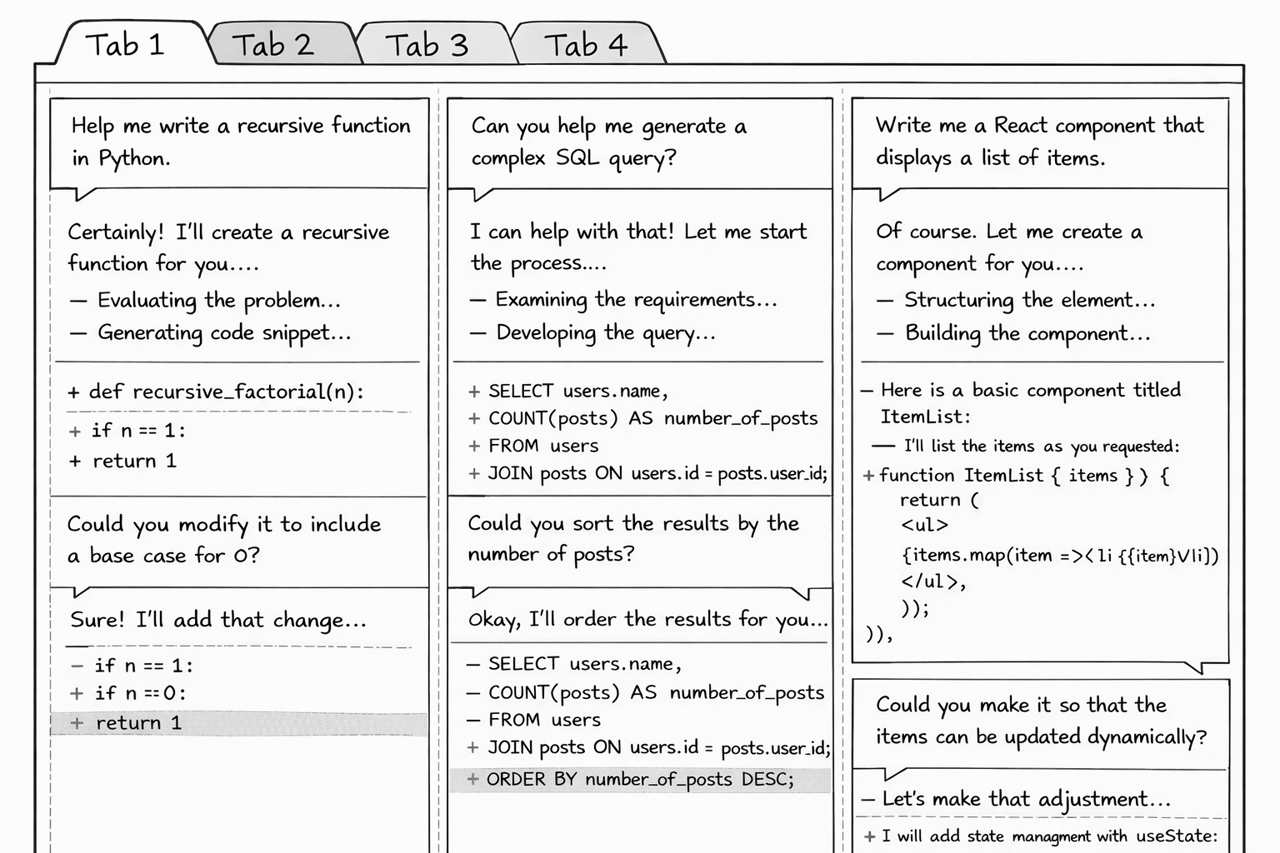
The panel width grows until the work is orchestrating multiple agents, no longer the code itself.
For completeness, the final Yegge stages:
Stage 7: 10+ agents, hand-managed. You are starting to push the limits of hand-management.
Stage 8: Building your own orchestrator. You are on the frontier, automating your workflow.
Perhaps agent orchestration is the productivity multiplier I yearned for, all those years ago.
If so, programming is trending further from the woodworking-like, hands-on flow state I described at the beginning of the article. In the agentic frontier, the engineer-favorite question, “Which IDE do you use?” doesn’t matter so much. Nor that you use the terminal. What matters more is a mind for the product you want, rather than the code to get there.
I might’ve backed the right horse several years in a row. But horse riding is quaint when everybody gets to fly a spaceship.
Vibe engineering
When anybody with a modest computer can be a vibe coder, I can’t help feel a loss for the hands-on skills I invested so much time in. But I’m hopeful engineering discipline still offers some expertise to the world.
First, some reassurance: everybody is on a different stage of their AI adoption journey, software engineer or not. Remember the temporarily aborted rollout of Cursor’s wider agent window. Technology is quick to change. People are slow to change.
In Silicon Valley and on tech social media, the cutting edge discussion buzz makes it seem like everybody is at least Yegge stage 5. Zooming out of the Silicon Valley echo chamber, the picture changes. What’s hot in the valley hasn’t reached SMBs. Many SMB software engineers are still stages 1-2. Most people are stages 0-1 (“I chatted with AI a couple years ago and it sucked”). We all know somebody who hasn’t even tried generative AI. In tech, we lose sight of that.
Good as the agents have gotten in the last several months at tool calling and one-off scripts, I can’t yet trust them without process. I’d be fired. Well, it hasn’t been said in those words. Rather, if I can barely explain to myself or to my team what I shipped to production, and there’s a big, hard-to-reverse regression, the business is going to be in trouble and I’m going to be in trouble.
(If instead you work in a hero culture, AI will let you produce awareness-building fires, faster.)
With hobby projects, I’ve vibed, turned my engineer mind off, and lost connection with what the AI actually built me. Simon Willison lists these evergreen engineering practices, like automated testing and good version control habits, to keep the AI in line. They amplify already good engineers. Meanwhile a truly vibes-only project will go off the rails and collapse under its own tech debt weight.
If you’re told AI must be a 10x coding multiplier and you can’t see how to reach that number, remember engineering constraints don’t disappear just because code is cheaper to produce. “10x output” claims often ignore non-coding bottlenecks. If anything, team constraints become more obvious: review quality, shared understanding, operational safety, and coordination. A 10x claim that retains these processes seems unrealistic.
The engineering practices seem evergreen, at least. They were developed to wrangle the unruly mess humans made with text-based coding, and as long as AI-assisted programming still builds on that swamp, they remain a good idea.
Could a team without those engineering processes safely leapfrog teams with? Maybe a near-future AI model won’t need process. The entrenched senior engineer can dismiss the new generation of tools and tool wielders as not knowing what they’re doing. Such a dismissal sounds eerily like the cycle of tech: someone doing something new, different, and cheaper, then taking over.
From my article yearning for a productivity boost:
Most consumers though will settle for cheap and highly available. Economics wins.
…
The technology that ultimately matters is not some hotly debated contender. What matters is the technology where you forget what the old way of doing things even was.
Did you know there was a typesetter profession?
It’s hard to say if we’re seeing a shift in duties, the elimination of process, and/or the elimination of jobs we will soon forget existed. The future is here, it’s just not evenly distributed yet.
Part of me wanted this better way of expressing programming to the computer. Back in 2014, I was already asking for a mode of creation more powerful than hand-writing text for every last detail. AI orchestration may be the closest thing yet to that wish. I like the extra leverage. I like the speed. I like that the terminal and other text-first tools I invested in still map surprisingly well onto this new world. But the text is becoming AI chat everywhere, whether you use a terminal AI instance or a desktop AI instance. I feel a little sad that one of the most intimate, hands-on parts of the job may matter less.
I get to keep my hands on home row, at least for one more turn.